
General
note
This information is only relevant for Admins managing a Playground Private Exchange.
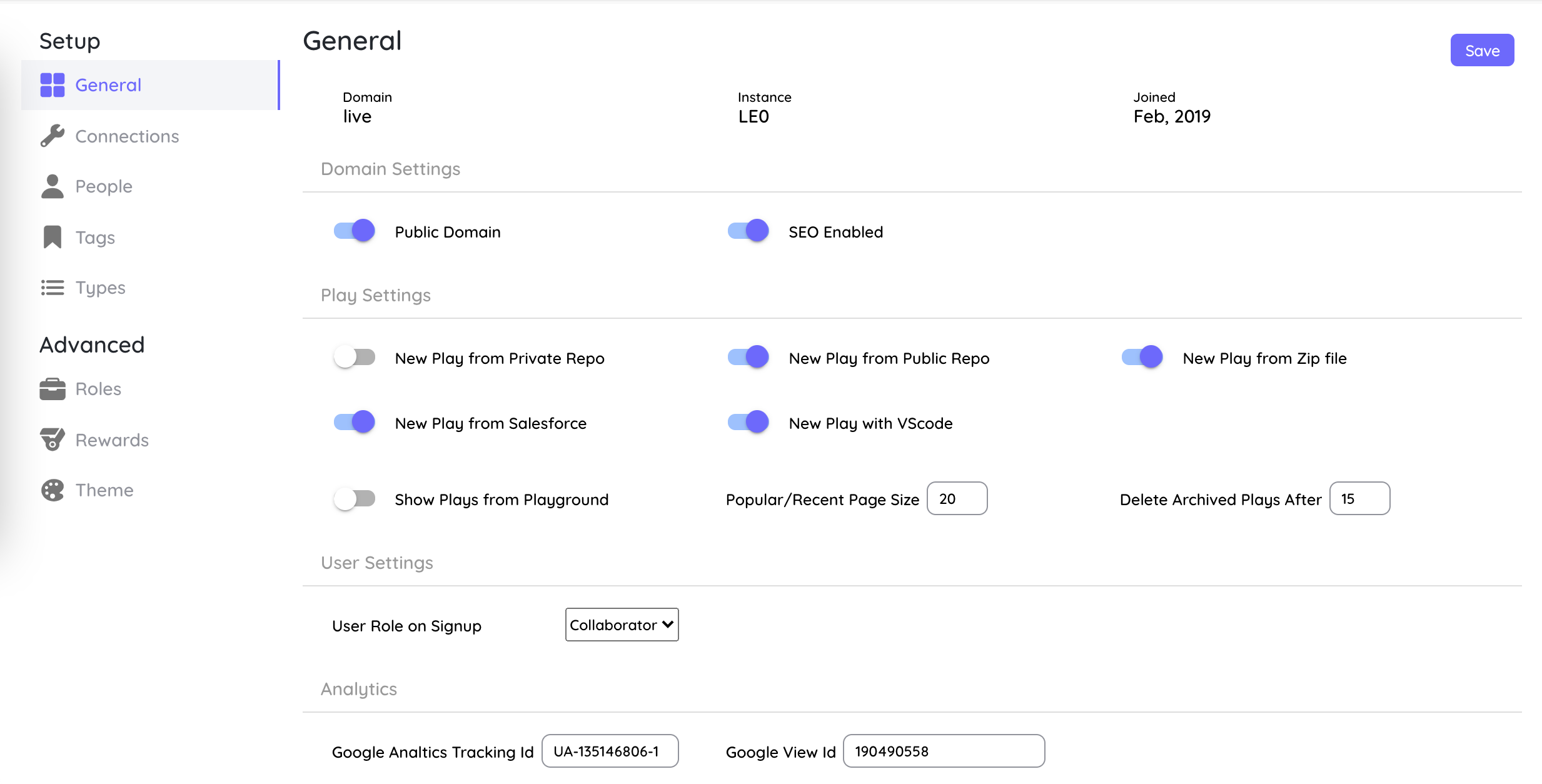
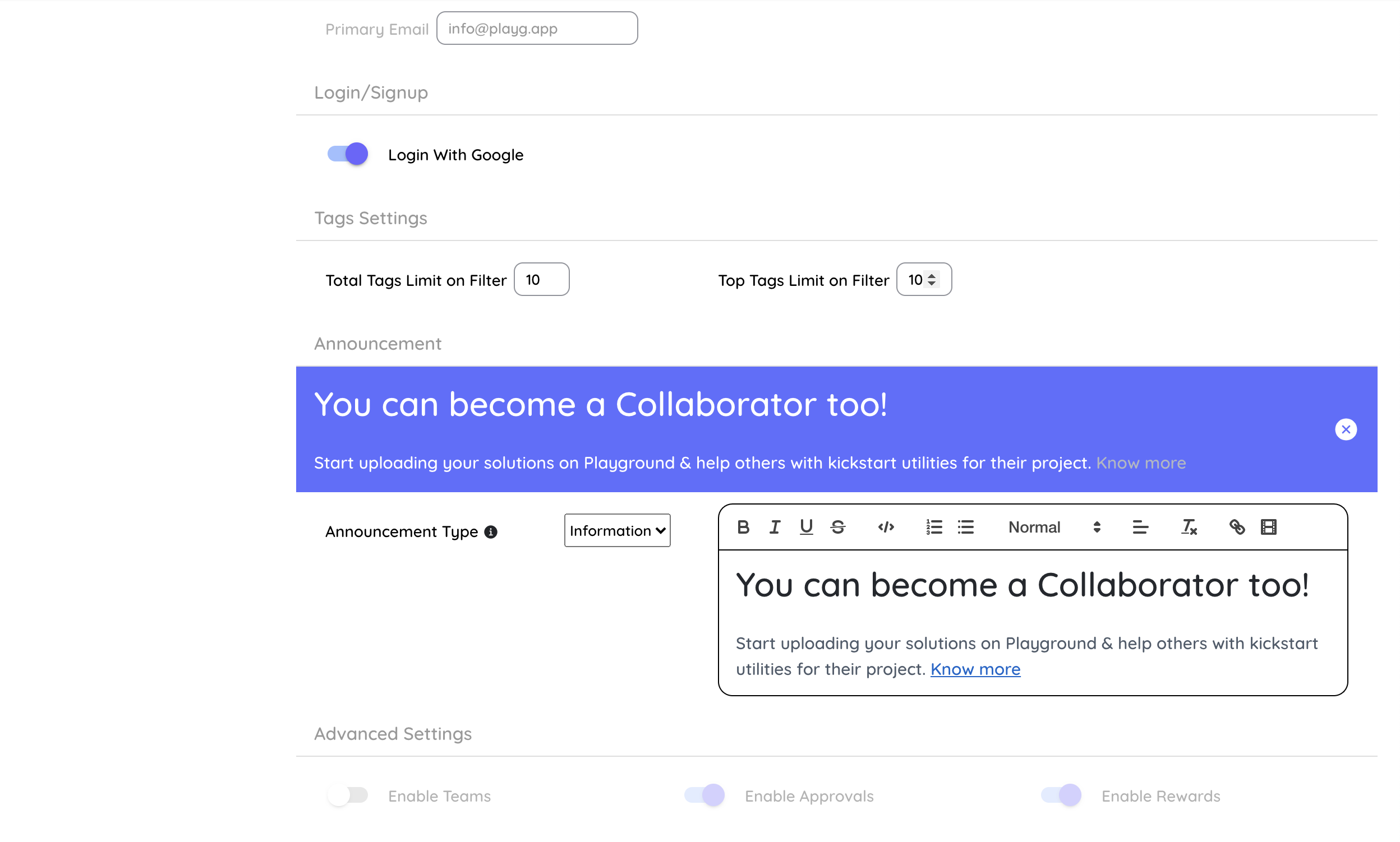
This the section where we you can view/control the general settings listed below:
- Basic Information Your domain, Playground instance and date you joined playground.
- Domain Settings This is internal to Playground and will be managed by Playground team, therefore these are disabled.
- Allowed Email Domains On a private Playground, only people with an email on one of these exact domains can sign in or sign up, with any sign-in method (Google, Salesforce, SAML or OpenID Connect). See Allowed email domains. Not shown for public domains.
- Play Settings These control the options user gets
- To create a new play, like via Public/Private Repo/Zip/Salesforce/VSCode
- To set page size to display number of plays on for Plays Page
- To set frequency of deletion of archived plays. Default is 15 days from being archived
- User Settings This controls the role that a new user gets by default on signup.
- Analytics Settings This is internal to Playground and will be managed by Playground team, therefore these are disabled.
- Notifications This is internal to Playground and will be managed by Playground team, therefore these are disabled.
- Login/Signup Sign-in methods (Google, Salesforce, single sign-on) and the sign-in policy have moved to Advanced → Connections.
- Tag Settings To control the tag limits on filter.
- Announcement Settings This can be used to show announcements to all users (authenticated or unauthenticated)
- Advanced Features To turn optional features on or off for your Playground: Teams, Approvals, Rewards, Packs (BETA) and MCP (BETA), and single sign-on with SAML 2.0 or OpenID Connect (2.1.10 and later). Sign-in methods themselves (Google, Salesforce, single sign-on and the sign-in policy) are managed under Connections.
Allowed email domains
On a private Playground only people with a work email can sign in or sign up. List the email domains that count as work emails, for example neuraflash.com and partner.io.
- Exact match.
neuraflash.comallowsname@neuraflash.comonly. It does not allowneuraflash.app,mail.neuraflash.comorevilneuraflash.com. Add each domain (and sub-domain) you want to allow. - Applies to every sign-in method and to every sign-in, not only signup.
- Public Playgrounds have no email restriction, so the section is hidden.
- Add a domain by typing it and pressing Add, remove it with the x on its chip, then press Save domains. You can list up to 20 domains.
- You cannot remove your own email domain from the list, so you cannot lock yourself out.
caution
Saving the list takes effect at each person's next sign-in. People already signed in keep working until their session ends, but anyone whose email domain is not listed is then refused. List every legitimate domain, including contractors and aliases, before you save.
While the list is empty, Playground keeps the earlier rule (the email domain must contain your Playground name). Add your domains here to switch to the strict, exact rule.